spacecolonyfans.net...welcome!
|
|
Game Interface & Hotkeys
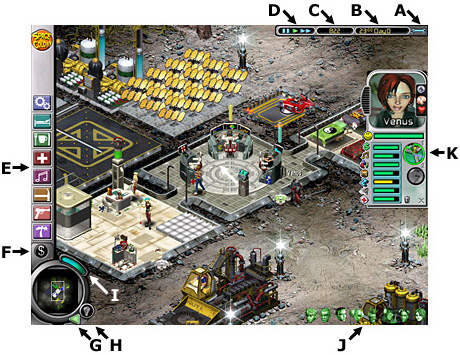
Space Colony's interface is simple and fairly intuitive. Play the tutorial if you haven't already, and that should answer most questions. Below is a list of keyboard shortcuts and a screenshot with the main controls labeled.
HOTKEYS:
- arrow keys - scroll around map
- P - pause game
- [ - run game at normal speed
- ] - run game at turbo speed
- Space Bar - display Bridge Screen
- T - open Trade Controls
- Escape - display game options
- Tab - toggle interface on/off
- Page Up - next colonist in list
- Page Down - last colonist in list
- Enter - center view on selected colonist
Space Colony Game Interface:
- A - Game Options
- B - Mission Clock
- C - Credits Banked
- D - Game Speed (pause, normal, turbo)
- E - Building Selection Panel
- F - Sell Button
|
|
Text and site design copyright © 2004- Stellalune. Game art, screenshots, Space Colony name and logo copyright © 2003- Firefly Studios and Gathering of Developers. All rights reserved. See the main page for copyright guidelines.
|
|